Home › Metrado quoting app
Metrado · AI-assisted quoting software, no monthly fee
The quoting app for builders and tradespeople in Spain
Metrado is quoting software and a mobile app for self-employed tradespeople, builders and small construction firms in Spain. Create a professional quote on site or in the office: dictate it, turn a paper quote into a clean PDF, start from photos of your work or type it in, and Metrado works out the IVA, the IRPF withholding and the deposit to the cent. Pay-per-use pricing: you only pay for the quotes you make.
- Dictate on site
- Paper estimates to PDF
- Works with no signal
- Credits never expire
Free trial of 3 quotes, no card needed: just your first name and email. Then a pack of 10 for €12 + VAT, no subscription.
| Consumer unit for the premises1 unit | €340.00 |
| LED light points12 × €18.50 | €222.00 |
| Electrical certificate (CIE)1 unit | to confirm |
| Subtotal | €562.00 |
| IVA 21% | €118.02 |
| Total | €680.02 |
| Deposit 30% | €204.01 |
Four options to start
Build your quote by voice, from a photo or by hand
Whether you price a job on site with your phone or write up the estimate in the evening at your desk, choose whatever works best for you and save time: you always finish in the same simple editor, with the same sums and the same PDF.
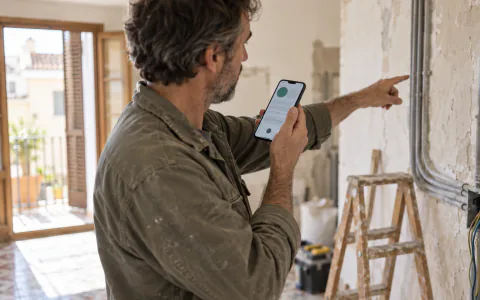
Dictate the quote
On site, describe the work out loud, whether it's a bathroom refit or a kitchen extension, the way you'd explain it to a colleague, and Metrado suggests the lines. Keep dictating for more items in the same quote.
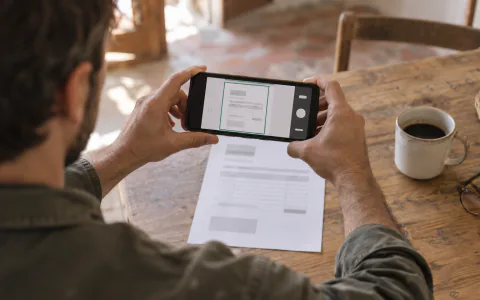
Turn a paper quote into a PDF
Handwritten estimates from the van, a photo or an old PDF: Metrado reads them and shows you the original right next to the digital version. Choose to reproduce it exactly as it is or redo it with your template.
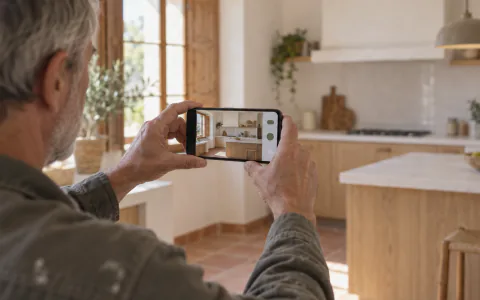
Start from photos of your work
Keep photos of your jobs in Metrado and choose which ones go with the quote: inside the document or in a photo appendix, in the order you like.
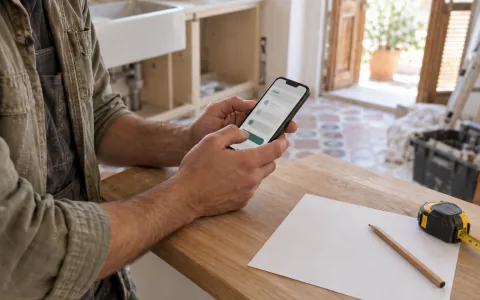
Type it in
Build it line by line, or from your library of standard items, labour and materials: your own list of rates, with the prices you set. You can also duplicate an earlier quote and change only what you need.
From the visit to the PDF: the quoting process, step by step
Whichever way you begin, every quote follows the same simple steps, from the customer’s request to the PDF they receive:
- Sign up for the free trial. All you need is your first name and email, no card. Set up your logo, your colour, your payment terms and your bank details once, and every quote uses them.
- Build the quote. Dictate the work in the van in the minutes after the visit, while the details are fresh; or photograph a handwritten estimate, or type the line items in.
- Check the quote. Anything missing is marked “to confirm” and left out of the total, so nothing goes out with a gap in it.
- Set it to “Ready to send”. This is the only step that uses a credit, once per quote.
- Get it to your customer. By email, with a link or straight from your phone’s share menu. Once the quote is accepted, you raise the invoice in your usual accounting software.
Accurate sums
Accurate pricing with IVA, IRPF withholding and deposit, to the cent
The sums are done automatically by an exact calculation system, the same on your phone and on the server, and the total updates live as you add items. The AI never calculates an amount.
- IVA by rate. Each line has its own IVA rate, and the tax is worked out on the base for each rate, not by adding up rounded amounts line by line.
- IRPF withholding. If your customer is a business and you have to apply it, enter the percentage: Metrado works it out on the taxable base and gives you the net amount payable.
- Deposit. Two options: a percentage or a fixed amount, with the balance still to pay.
- Discounts and sections. Discount per line or on the total, sections and subtotals to structure labour, material and other costs.
What happens when something is missing
- It stays blank. A price, a quantity or an IVA rate you haven't given is never filled in with a guess or an estimate.
- It's marked “to confirm”. The line comes out of the totals and the amounts show as provisional.
- The quote waits for your check. It can't be set to “Ready to send” while anything is still pending.
And if you import an old quote whose totals don't add up, Metrado shows you both figures, the one on the document and the recalculated one, without correcting anything on its own.
The document
A PDF with your logo, in your customer's language
The software lets you generate a professional PDF with your branding, not a spreadsheet.
4 templates
Minimal, Modern, Classic and Premium, with a photo gallery. With your logo, your colour, your payment terms and your bank details.
In English, Spanish or French
Each quote has its own language option, whatever language you use the app in: quote your Spanish clients in Spanish and your British or Irish clients in English.
You send it yourself
By email, with a link or from your phone’s share menu, at any time, or print it. Every version sent stays in the history, so you can keep track of each one.
Project plans
Attach the project plans, as a PDF or an image: they’re added right at the end of the PDF, in a “Plans” appendix.
On site and in the office
A mobile quoting app that works even with no signal
The Metrado mobile app installs directly on the home screen of your iPhone, your Android phone, your tablet or your computer, with the same features on every platform and without going through an app store. Start a quote on site and finish it on the computer, without wasting time: one tool and one workflow from the job to the PDF.
- Offline: create and edit quotes in a basement or out in the countryside; they sync when the signal comes back.
- Online: dictation and document reading need the internet, and Metrado tells you when there is none.
- Client records with their job addresses, to track the history of each job.
- User interface in English, Spanish and French: switch language with one tap.
You decide
AI that helps, but your price is your price
The AI is a tool that saves you typing: it transcribes, reads and sorts. A quote commits your word, so nothing goes out without your check.
It never makes up a price
No “guide” figures and no estimate of its own: no prices, no quantities, no VAT rates. Anything you didn’t say or that can’t be read clearly stays “to confirm”: better a blank than a guess.
Nothing is sent for you
No quote reaches your customer unless you send it.
Your data stays private
The system keeps each company’s data apart: it only sees its own clients, jobs and photos. Photos of your work are private.
You check everything first
Lines dictated or read from a document are checked one by one, and anything doubtful is flagged.
Pricing
Simple pricing: you only pay for the quotes you make
Simple, transparent pricing: start with a free trial, no card needed. If it suits your workflow, buy a pack when you need one: no monthly subscription, no lock-in, and credits never expire. A quiet month costs you nothing.
One credit = one finalised quote. It is used when you set the quote to “Ready to send”, once only. Drafts, dictations, imports, edits and duplicates are free and unlimited, and all features are included.
Credits never expire: they’re good for as long as you need. At 5 quotes a month, the pack of 30 lasts you six months.
Savings are worked out against the per-quote cost of the pack of 10. Pricing excludes Spanish VAT (IVA, 21%). Secure payment through Stripe, with a VAT invoice.
Before you decide
Metrado or an Excel or Word quote template
A quick comparison: a template can be excellent at your desk; out on a job, on your phone, it soon falls short, and a phone app built for estimating is easier to use.
| Metrado | Excel or Word template | |
|---|---|---|
| On your phone, on site | Yes, by voice too; with no signal, by typing | Awkward on a small screen |
| Sums | IVA by rate, IRPF and deposit, to the cent | Formulas you have to check yourself |
| A missing amount | Marked “to confirm” and left out of the total | An empty cell can go unnoticed |
| Paper estimates | Read and turned into clean PDF quotes | Typed out again, which can take hours |
| Templates | 4 branded quote templates with your logo | One template to maintain yourself |
| PDF language | English, Spanish or French, per quote | Whatever the template is in |
| Pricing | 3 free; then €1.20 + VAT per quote or less, credits never expire | Included if you already have the software |
Already using invoicing, accounting or job management software? Metrado doesn't replace it: it handles the quoting, on the job, and your invoices stay in your usual tools.
Buying guide
How to choose the best quoting software for your trade
Before you compare the best quoting apps and estimating tools, to find the right one, think about how you work: on site or at a desk, how many jobs you quote for each month, and how much time you want to spend on paperwork. These are the features and options that matter most for small contractors and construction trades.
What to check in estimating and quoting software
- A mobile app you can use on site: software that fits your workflow and your needs, and works on your phone, even with no signal, not just on a desktop computer.
- Speed on the job: customers often ask more than one builder, so a fast, clear quote helps. Try it on a real job: during the trial, get a feel for the app on your phone and check whether it gets the quote out faster than your current process.
- Accurate sums and Spanish tax support: IVA by rate, IRPF withholding and deposit worked out automatically, with no formulas to check.
- Your own pricing: your labour rates, material costs and supplier costs in a catalogue (your own list), so you can build each quote from items you reuse from job to job.
- Professional templates: a clean, branded PDF that looks good, with your logo, in your customer’s language.
- Clear pricing: the options are a monthly subscription, a limited plan at no cost or pay per use; compare the real cost over a year, not just the cost per month.
- Integrations: if you invoice from accounting software such as Xero, check how an accepted quote gets there.
- AI that doesn’t guess: anything missing should stay visible, not be filled in with an estimate.
- A free trial with no commitment: most quoting tools offer one; with Metrado the first 3 cost nothing, then packs with no monthly fee.
Used to quoting in the UK? In Spain you charge IVA instead of UK VAT, and when your customer is a company you may have to apply IRPF withholding. The right quoting software should handle both without spreadsheets or manual formulas.
Quoting, invoicing and job management: which is best for you?
- Quoting software prepares the offer: items, materials, taxes and deposit. Best for tradespeople and builders who do their pricing on the job. That’s what Metrado does.
- Invoicing or accounting software issues the invoices and, in Spain, has to meet the Verifactu rules. Best for billing once a quote is accepted.
- Estimating software for large projects measures plans and builds up costs from price databases: useful for estimators and the project team on big construction projects, more than you need for everyday jobs.
- Job management software brings together scheduling, purchase orders, job tracking, time tracking, customer communication, billing and stock. Best for firms with an office team managing several jobs at once.
- Your gestor or accountant records the invoices in the accounts and files your tax returns.
Who it's for
For tradespeople and small firms who quote for jobs and services
If you estimate and quote for several jobs a month and would rather spend your evenings on something else than hours at your desk, Metrado is for you: a quoting app built for sole traders, builders, contractors, service businesses and small construction firms, not full job management software or a suite of tools.
- Renovations and extensions
- Plumbing
- Electrical
- Painting and decorating
- Carpentry
- Air conditioning
- Locksmiths
- Building work
- Gardening
- Pool service
- Cleaning
- Property maintenance
What Metrado doesn't do
- No invoices: keep using your invoicing software to bill.
- No construction pricing database: the figures are yours, and you keep them in your catalogue.
- It doesn't find you clients: it's a tool for quoting, not a lead marketplace.
- No job management: no scheduling, job tracking, time tracking or stock control.
If you also want to be found
We’re WebAutonomos: we also build websites for builders and tradespeople in Spain, so local customers looking for your trade in your area ask you for a quote.
Frequently asked questions
Questions people ask us about Metrado
How much does Metrado cost?
Pricing is per quote: the first 3 are free. After that you buy a pack: 10 quotes for €12 + VAT, 30 for €29 + VAT or 100 for €79 + VAT. There’s no subscription or fee per month, credits never expire, and every pack includes all features.
Is there a free trial?
Yes: a free trial of 3 quotes, with every feature and no card needed: all we ask for is your first name and email. There’s no permanent free plan, only this limited trial: after that you only pay for what you use, in packs.
What counts as a quote?
One credit is one finalised quote: it’s used when you set the quote to “Ready to send”, a single time per quote. Drafts, dictations, imports, edits and duplicates are unlimited and use no credits, and if you need to update or resend a finalised quote later, that costs nothing more.
Do credits expire?
No. The credits you buy never expire: if you have a quiet month, they stay in your account.
Do I get an invoice?
Yes. Every purchase comes with an invoice showing the VAT. When you pay, you can enter your company name and your tax number.
Does the AI set the prices?
No. The AI transcribes what you dictate, reads documents and sorts the lines, but it never makes up a price, a quantity or a VAT rate: anything missing stays “to confirm” and out of the totals. The sums are done by an exact calculation system.
How do I create a quote on my phone?
With Metrado, open the app in your browser or install it on the home screen of your iPhone or Android phone, without going through an app store. Then build the quote: dictate it, photograph a paper quote or type it in. You can finish it later on the computer: same workflow on every device.
Does Metrado work offline?
Yes, for creating and editing quotes: they’re saved on your phone and sync when the connection comes back. Dictation and document reading do need the internet, and Metrado tells you so.
What should a quote include?
Your business and client details, a number and a date, how long the offer is valid (a number of days or an end date), the job or project address, the labour and material items with quantities and prices, the base, IVA by rate and the total, and your payment terms. Metrado puts them all in the PDF you generate and can add a space for the client’s signature.
Can I write the quote in Spanish for a Spanish customer?
Yes. Each quote has its own language: the PDF can come out in English, Spanish or French, whatever language you use the app in. The app itself is available in all three.
What’s the difference between a quote and an estimate?
An estimate is a rough idea of the cost; a quote is a fixed price for the job, valid for a set time. Metrado is built for quoting: every line has its own quantity and price, and the PDF shows how long the offer is valid. Rough estimates are good for a first idea; if that’s all you’re giving, say so clearly on the document.
Which is the best quoting app for tradespeople?
The best quoting software is the one you’ll use on real jobs, for fast estimates as well as detailed quotes. Look at the tools and features you need day to day, the speed on site, the pricing (a monthly subscription or pay per quote) and whether it handles Spanish IVA and IRPF. For a small business or a service firm that would rather not pay every month, Metrado’s pricing is per quote, with a free trial.
Is it suitable for construction work?
Yes: it’s designed for builders, contractors, renovation firms and construction trades, with sections for each stage of the project, labour and materials, and a “Plans” appendix. It doesn’t do job management, job tracking, scheduling or invoicing. For large projects measured from plans, specialist estimating software is a better fit.
I’m used to quoting in the UK. What changes in Spain?
The main change is the taxes: you charge IVA instead of UK VAT (21% standard rate, lower for some work), and when your customer is a company you may have to apply IRPF withholding. Metrado works out both and gives you the net amount payable. Your pricing and materials stay yours: only the tax system changes.
Can I see a demo first?
There’s no sales demo: the first 3 cost nothing, so you can try the tool yourself, on your own real jobs.
Can I start with an estimate and turn it into a quote later?
Yes: keep it as a draft while the figures are still estimates, then finalise the quote when they’re confirmed. Drafts use no credits.
Does Metrado do invoices?
No. Metrado focuses on the quote, from the job to the PDF you send your client. For invoicing and job management, keep using your usual software.
Who can see my quotes?
Only your company sees your data. Each company only sees its own clients, jobs and photos, and Metrado sends nothing to your clients: the quote goes out when you send it.
Who's behind Metrado
Metrado is an app by WebAutonomos, the brand of PASURITE SLU, based in Ontinyent (Valencia). We’re the same team that builds websites for the self-employed and small firms in Spain, and we work with you in English: see webautonomos.es.
Create your next quote with Metrado
Dictate, photograph or type: your first 3 quotes are free, no card needed.
Try it free →